
How to coordinate care between family members
To coordinate care between family members, keep each helper, visit, task and handoff note in one shared record. CareMapAI's Care Team Manager and Support Circle and Task Delegation Planner let you list who can help, schedule visits, assign tasks and download records for the people involved.

The problem
Your brother says he can help on Thursday. A neighbour offers to pick up groceries. A paid helper needs the visit notes. By Friday, the details are split between a calendar, a group chat and three separate calls. Everyone is trying. Still, you are the one who has to explain the same thing again.
The fear is that if you stop holding the whole picture, something will be missed. A task will sit with no name beside it. A helper will arrive without the note they need. Your parent will be the person who feels the gap. You need a shared record that does not depend on one person remembering every promise.
You are not the first
Care coordination often begins with good intentions and turns into a quiet job for one family member. The person who notices the loose end becomes the person who sends the reminder, then the person who follows up after the reminder. It is tiring work, even when everyone cares.
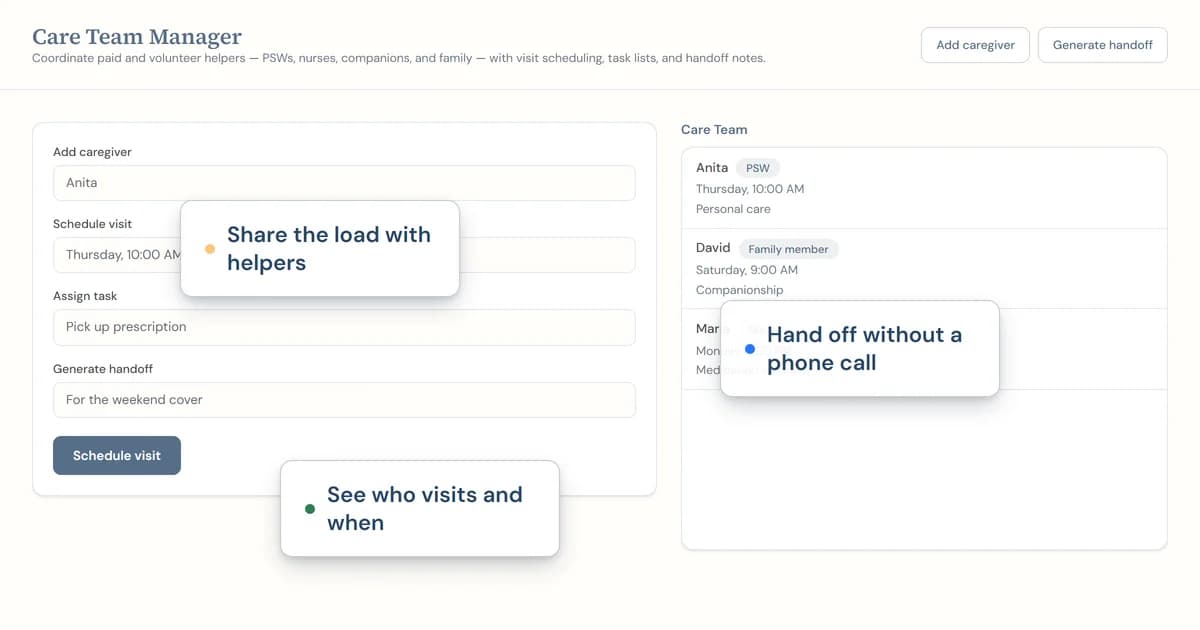
CareMapAI gives you two places to spread that work. Care Team Manager holds helpers, visit schedules, tasks and handoff notes. The Support Circle and Task Delegation Planner holds the people who can help, what tasks they can take on, their availability, reliability and notes. You decide what to share and who owns the next task.
How does care-team coordination work in CareMapAI?
Care Team Manager is its own page at /care-team. It has controls to add a caregiver, schedule a visit, assign a task and generate a handoff. It also connects to the reminder system for visit schedules. The handoff sheet gives you a record to generate when another person needs the current plan.
The Support Circle and Task Delegation Planner lets you add a support person with their name, relationship, tasks they can help with, availability, reliability and notes. It can download a text-file support-circle summary. Care Team Manager also reads state from six other CareMapAI tools to offer import suggestions. Review those suggestions before adding them to the team record.
What you get
- A care-team page for helpers, visit schedules, tasks and handoff notes
- Controls to add a caregiver, schedule a visit and assign a task
- A generated handoff sheet for the current care record
- Visit-schedule reminder-system integration
- A support-circle record with name, relationship, tasks, availability, reliability and notes
- Import suggestions based on state from six other CareMapAI tools
- A text-file support-circle summary from Download Circle
How it works
- Add the people who help and write down what each person can take on.
- Schedule visits, assign tasks and put the current handoff notes in the care-team record.
- Review import suggestions, then generate a handoff or download the support circle.
How do I coordinate care between family members?
To coordinate care between family members, begin with a plain list of people and tasks. Write down who can help, what they can help with and when they are available. The Support Circle and Task Delegation Planner gives each person a name, relationship, tasks, availability, reliability and notes. That makes the first handoff more specific than a message asking everyone to pitch in.
Next, put visits and tasks in the Care Team Manager. Add the caregiver, schedule the visit and assign the task. Keep the handoff note short enough to read before someone walks in. A note about the task is more useful than a long recap of the week.
Use the record before a family call. Read the open tasks, the next visit and the helper notes. Then ask one direct question: who is taking this task? The answer belongs beside the task, not in a message that will be hard to find on Tuesday.
What should a family care handoff include?
A family care handoff should include the helper, the visit, the task and the notes the next person needs. Start with the facts that change the visit: who is coming, what they agreed to do and what needs follow-up. Keep the note factual. The Care Team Manager has a handoff-generation control, so you can create a sheet from the current record.
If you use another CareMapAI tool, Care Team Manager can offer import suggestions from state in six tools. Treat each suggestion as a prompt to review, not a fact that never changes. Add it only after you have checked it. A good handoff is current, short and clear about who owns the next task.
Frequently asked questions
How do I coordinate care between family members without doing everything myself?
Start by listing the people who help, the tasks they can take on and when they are available. CareMapAI's Support Circle and Task Delegation Planner records each person's name, relationship, tasks, availability, reliability and notes. The Care Team Manager then gives you a place for helpers, visits, tasks and handoff notes.
What should I put in a family care handoff?
Include the helper, the visit, the task and the notes the next person needs. Care Team Manager has controls to add a caregiver, schedule a visit, assign a task and generate a handoff. Keep the handoff factual and short, then update it when the task or visit changes.
Can CareMapAI suggest information I already entered in another tool?
Yes. Care Team Manager reads state from six other CareMapAI tools to offer import suggestions. Review each suggestion before you add it to the care team record, because the source information may have changed. Import suggestions help you avoid retyping details, but you remain responsible for deciding what belongs in the handoff.
Can I keep track of who is available to help?
Yes. The Support Circle and Task Delegation Planner has fields for name, relationship, tasks a person can help with, availability, reliability and notes. Add the people who have offered help, then update the record when their availability changes. A written list is easier to use than relying on an old group chat.
Can I download a care-team record?
Yes. Care Team Manager generates a handoff sheet, and the Support Circle and Task Delegation Planner has a Download Circle button that creates a text-file support-circle summary. Use the download when a family member needs a copy of the current helper list or the tasks people have agreed to cover.
Related reading
Read long-distance caregiving tips for staying connected and caregiver support groups in Canada. Browse all CareMapAI tools, including a caregiver burnout check and an emergency information sheet.
This is one of 31 free tools in CareMapAI.
Ready to use the How to coordinate care between family members?
Register free to use itCareMapAI supports planning and organization. This service is not a substitute for professional medical advice, diagnosis, or treatment.