
Medication tracker for an elderly parent
A medication tracker for an elderly parent should keep the medication name, dosage, schedule, refill date and notes together with upcoming appointments. CareMapAI's Medication & Appointment Organizer gives you one list for each, plus a downloadable record and reminders for medication schedules, refills and appointments.

The problem
At the pharmacy counter, you are asked for the dosage and you reach for a photo on your phone. The refill date is in a calendar. The doctor's appointment is on a paper by the kettle, with one question you meant to ask written on the back. None of it is impossible to find. It is just never in the same place when you need it.
You are trying to keep the moving parts straight. The worry is that an old note, a missed refill or a forgotten appointment detail will slip through because you were managing three other things at the same time. You need a reliable record, not another memory test.
You are not the first
Medication lists change. Appointment times move. A family member may call from the waiting room while you are in traffic, asking for the name of the doctor or the schedule on a bottle. Most caregivers have built a system from photos, text messages and scraps of paper. It works until the details shift.
The Medication & Appointment Organizer puts the list and the schedule in one place. You decide what to add and when to update it. The organizer gives each medication and appointment its own fields, then keeps a download ready when you need to review the record away from the screen.
How does the Medication & Appointment Organizer work?
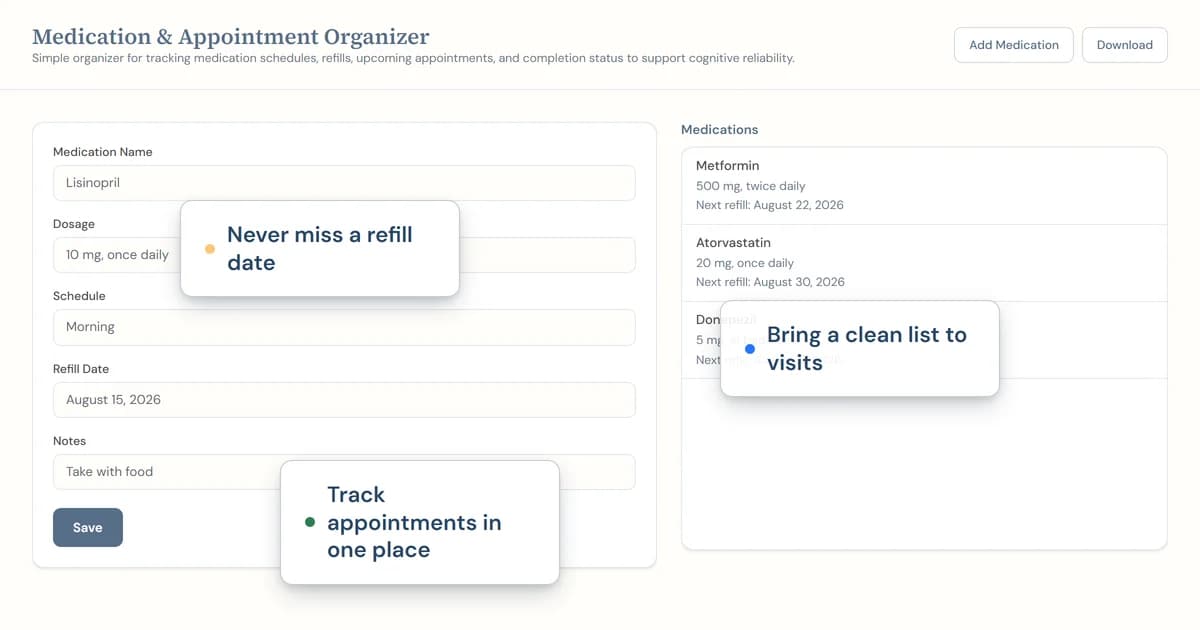
The Medication & Appointment Organizer has an Add Medication form for medication name, dosage, schedule, refill date and notes. Its Add Appointment form has appointment type, date and time, location, doctor and preparation notes. You can save the details as you gather them instead of rewriting the same information on a fresh page each week.
The tool also connects to the reminder system for medication schedules and appointments. Its Download button creates a text file with the medication list and appointment schedule. The medications you keep here are also pulled onto the printed Emergency Access Sheet. That printed sheet uses this organizer's saved medication entries, while the Emergency Access Sheet text download uses only details typed into that sheet.
What you get
- Medication entries with name, dosage, schedule, refill date and notes
- Appointment entries with type, date and time, location, doctor and preparation notes
- Add Medication and Add Appointment controls
- A single text-file download with the medication list and appointment schedule
- Reminder-system integration for medication schedules and appointments
- Saved medication entries used by the printed Emergency Access Sheet
How it works
- Add the medication details from the current label and the appointment details you have.
- Save changes when a schedule, refill date or appointment time moves.
- Download the list or use the saved entries when printing the Emergency Access Sheet.
What should a medication tracker for an elderly parent include?
A medication tracker for an elderly parent should include the medication name, dosage, schedule, refill date and notes. Put the details from the current label into one entry, then make a new check part of your routine when the pharmacy gives you an update. A record only helps when it matches what you have now.
Keep appointments close by. An appointment entry can hold the appointment type, date and time, location, doctor and preparation notes. Before a visit, read the preparation note and the current medication entries together. That gives you a factual list to bring into the room without relying on a hurried search through your phone.
The organizer records information. It does not tell you what a medication is for, change a schedule or replace the pharmacy's record. If the dose or timing is unclear, check the label or ask the pharmacy. That is a useful pause, especially after a change.
How can I prepare for an appointment without losing the medication list?
Keep the appointment and medication entries in the same organizer, then use the Download button when you need a text-file copy. Add the appointment type, date and time, location, doctor and preparation notes as soon as you have them. A short preparation note can hold the question you do not want to lose between now and the visit.
Read the medication list before you leave. Then look at the appointment entry for the location and time. The result is a short, current record you can check at the door. Update it after the visit while the changed details are still clear.
Frequently asked questions
What should I put in a medication tracker for an elderly parent?
Add the medication name, dosage, schedule, refill date and any notes you need to keep with it. The Medication & Appointment Organizer has those fields under Add Medication. Keep the entry current when the pharmacy label, refill date or schedule changes, and check the prescription label or pharmacy when accuracy matters.
Can I keep appointments in the same place as medications?
Yes. The Medication & Appointment Organizer also has an Add Appointment form with appointment type, date and time, location, doctor and preparation notes. Keeping the appointment beside the medication list can make it easier to find the details you need before leaving home or speaking with the clinic.
Does the emergency sheet use my medication list?
Yes, when you print the Emergency Access Sheet, its printed version pulls medications from the Medication & Appointment Organizer. Keep the medication list here current so the printed emergency sheet can use the saved entries. The Emergency Access Sheet text-file download contains only what you typed into that sheet.
Can I download my medication and appointment list?
Yes. The Medication & Appointment Organizer has a Download button that creates a text file with the medication list and appointment schedule. A downloaded copy can be useful when you need a private record to review with a family member or bring to a visit. Check the list before sharing it.
Can CareMapAI remind me about refills and appointments?
The Medication & Appointment Organizer has reminder-system integration for medication schedules and appointments. Enter the medication or appointment details in the organizer, then use the tool's fields to keep dates and schedules current. A reminder is only as good as the information on the entry, so update it after any change.
Related reading
Read caring for seniors with high blood pressure and understanding memory changes in aging. Browse all CareMapAI tools, including an emergency information sheet and a memory change tracker.
This is one of 31 free tools in CareMapAI.
Ready to use the Medication tracker for an elderly parent?
Register free to use itCareMapAI supports planning and organization. This service is not a substitute for professional medical advice, diagnosis, or treatment.